Print out your documents on the device
When your account is created, you will receive an email with:
- Your PIN code
- Your Card Registration Code (for optional Keyfob login)
To print your documents:
- Go to the physical printer in your office or designated printing area. The printer is locked until you identify yourself using the device’s touchscreen panel.
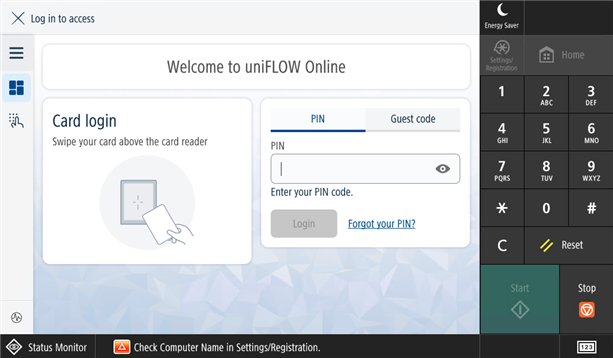
- On the device’s touchscreen panel, log in by either:
- Entering your PIN code, or
- Tapping your registered KeyFob.
- If you have forgotten your PIN, use the Forgot your PIN? option on the menu.
- Once logged in, choose one of the available options (the options available to you and the arrangements of icons will differ depending on your company's configuration:
- Copy
- Secure Print (to release held jobs — ensuring your documents remain private until you collect them)
- Scan (to scan documents, for example to your email, or to a connected cloud drive)
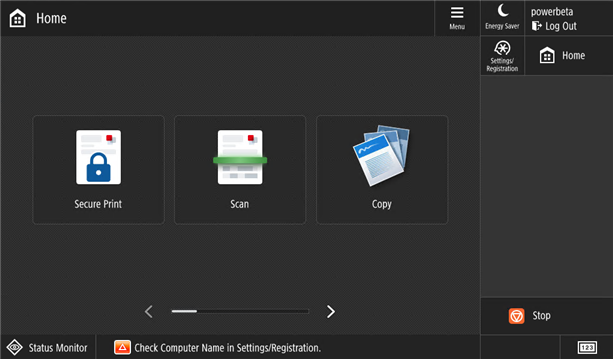
- In Secure Print, select the jobs you want to print and press the print button at the bottom right of the screen.
 If you need support please contact itqueries@thegelbottle.com.
Was this article helpful?
That’s Great!
Thank you for your feedback
Sorry! We couldn't be helpful
Thank you for your feedback
Feedback sent
We appreciate your effort and will try to fix the article